
Home › Selling & Pricing › Member Pricing Apps
Hands-on reviewAs of October 2026
Members Win Review: Member Pricing App, Hands-On
Short answer
Members Win by Win-Win gives Shopify customers with a tag, or all logged-in customers, a lower price on product pages that they also pay at checkout, with a join-to-save prompt for logged-out shoppers. Free has unlimited rules and 25 member orders a month, Pro is $9.99. It scored 65 of 100, with no reviews yet.
A simple, free-to-start member price tool. Percent discounts only, and no B2B workflows.
- Choose it if
You want VIP or member prices shown while browsing, based on customer tags, without duplicate products or discount codes.
- Skip it if
You need net terms, order forms, registration flows, tiered price lists, fixed prices or an app with reviews.
| Rating | None yet, 0 reviews (App Store, October 2026) |
|---|---|
| Built for Shopify | No |
| Launched | July 3, 2026 |
| Plans | Free (storefront badge, unlimited pricing rules, 25 member orders a month). Pro $9.99 a month (unlimited member orders, priority support). Client $1,000 a month. |
| Admin title | Members Only Pricing (the listing name is Members Win) |
We reviewed the Members Win admin and listing as of October 2026. It launched in July 2026 and has no reviews. The publisher also builds it; see the disclosure.
Setup
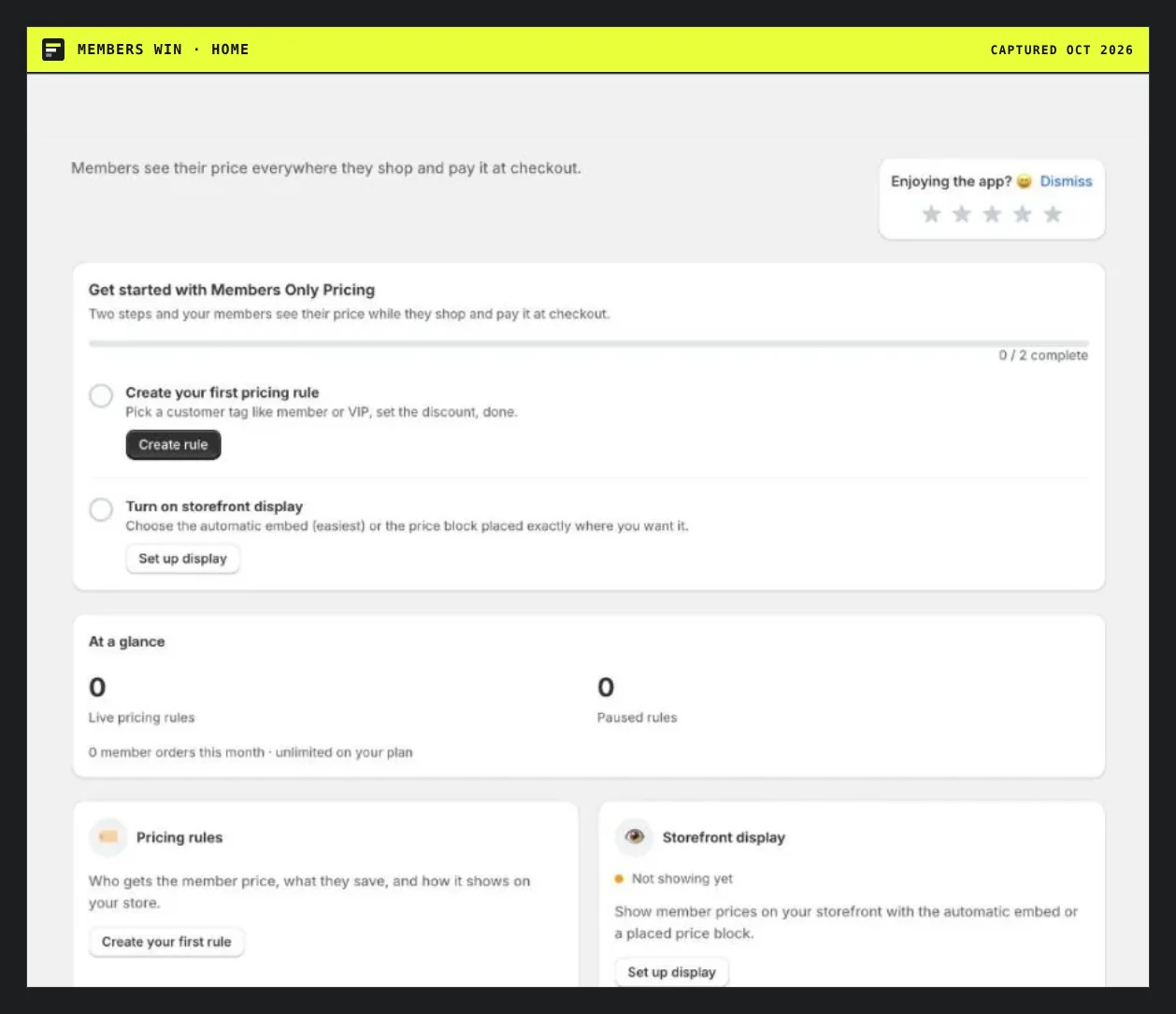
Home: members see their price everywhere they shop and pay it at checkout. Two steps.
Pricing rules
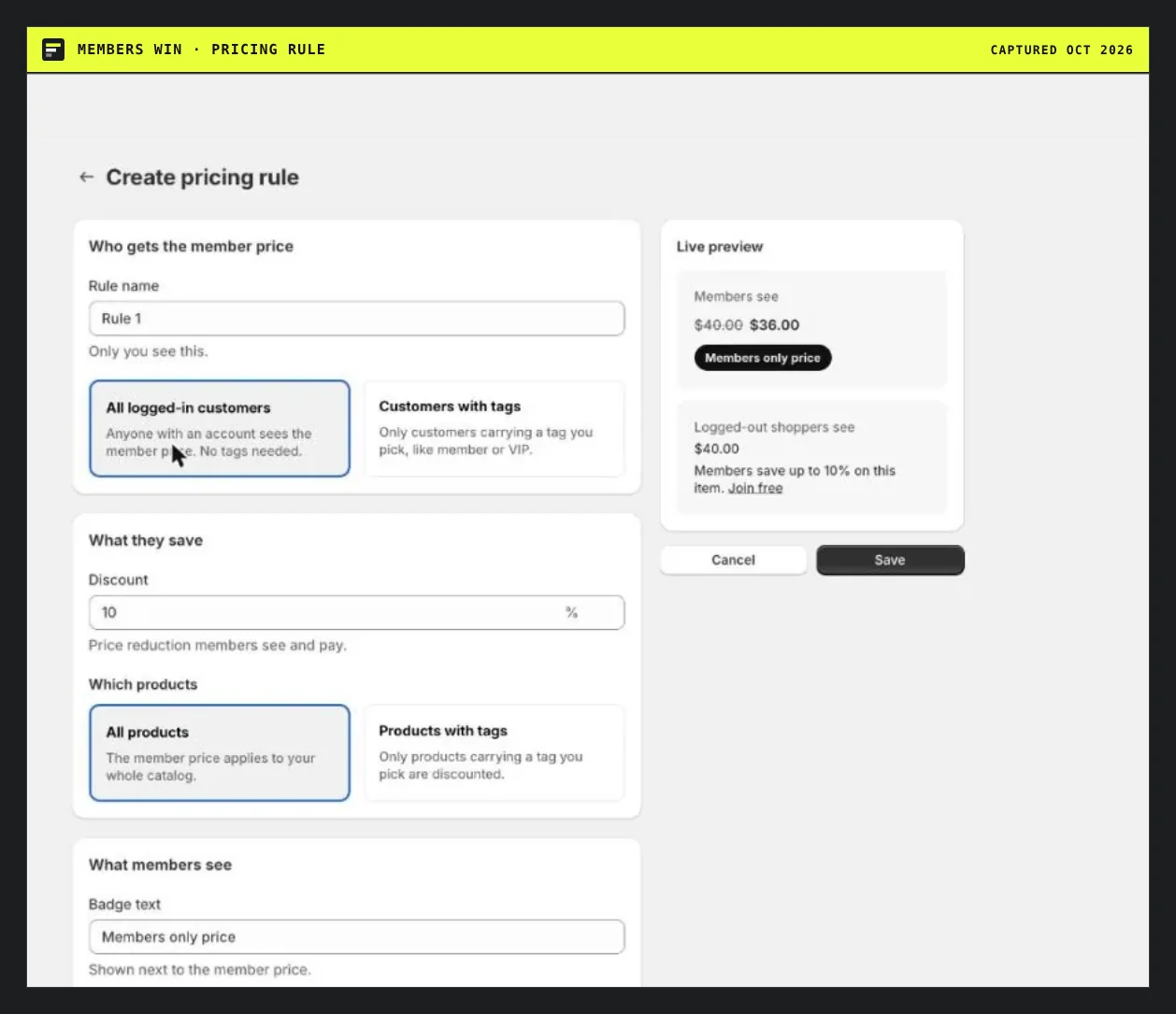
A rule picks who (all logged-in customers or customers with tags), a discount percent, which products (all or tagged) and the badge text. The preview shows member and logged-out views.
Pros
- Unlimited pricing rules on the free plan.
- Member price on the page while browsing, and at checkout.
- Join-to-save prompt for logged-out shoppers.
- No duplicate products, no discount codes, no theme edits.
Cons
- Free is capped at 25 member orders a month.
- Percent discount only in the rule we saw.
- No reviews, no Built for Shopify badge.
- No net terms, order forms or registration forms.
Who it is not for
- Wholesale with approvals and net terms: Wholesale Pricing Discount B2B or SparkLayer.
- Tiered price lists: SparkLayer or AltPrice.
- Stores that can do it natively: Shopify discounts can be limited to customer segments, but apply at checkout.
Score sheet
| Check | Result | Points |
|---|---|---|
| Price rule by customer tag or group | ✓ | 10 of 10 |
| Member price shown on the product page while browsing (stated) | ✓ | 10 of 10 |
| More than one tier, group or price list on free or entry plan | ✓ | 10 of 10 |
| Price types beyond one flat % (tiers, price lists, shipping) | ✗ | 0 of 10 |
| Free plan includes the core feature | ✓ | 10 of 10 |
| No % of value, per-order or overage fee listed | ✓ | 10 of 10 |
| All plan prices shown on the listing | ✓ | 5 of 5 |
| A paid plan with no cap on the core action | ✓ | 10 of 10 |
| Built for Shopify badge | ✗ | 0 of 10 |
| Rated 4.5 or higher with 10+ reviews | ✗ | 0 of 10 |
| Track record: 100+ reviews or launched by Oct 2023 | ✗ | 0 of 5 |
| Total | 65 of 100 |
See the ranking and the newer tag discount apps.
Questions people ask
Do members see the lower price before checkout?
Yes. Members see the member price on the product page while browsing and pay it at checkout. In the admin preview, a member sees $40.00 crossed out and $36.00 with a Members only price badge.
What do logged-out shoppers see?
They see the regular price, and you can add a join prompt like Members save up to 10% on this item. Join free.
Does it use discount codes or duplicate products?
No. The listing says it uses existing customer tags, with no duplicate products and no discount codes.